Instagram Highlights let you keep your best Stories permanently on your profile. Instead of disappearing after 24 hours, they stay visible right under your bio—perfect for FAQs, products, testimonials, or memories.
Here’s a complete guide on how to add Highlights on Instagram.
What Are Instagram Highlights?
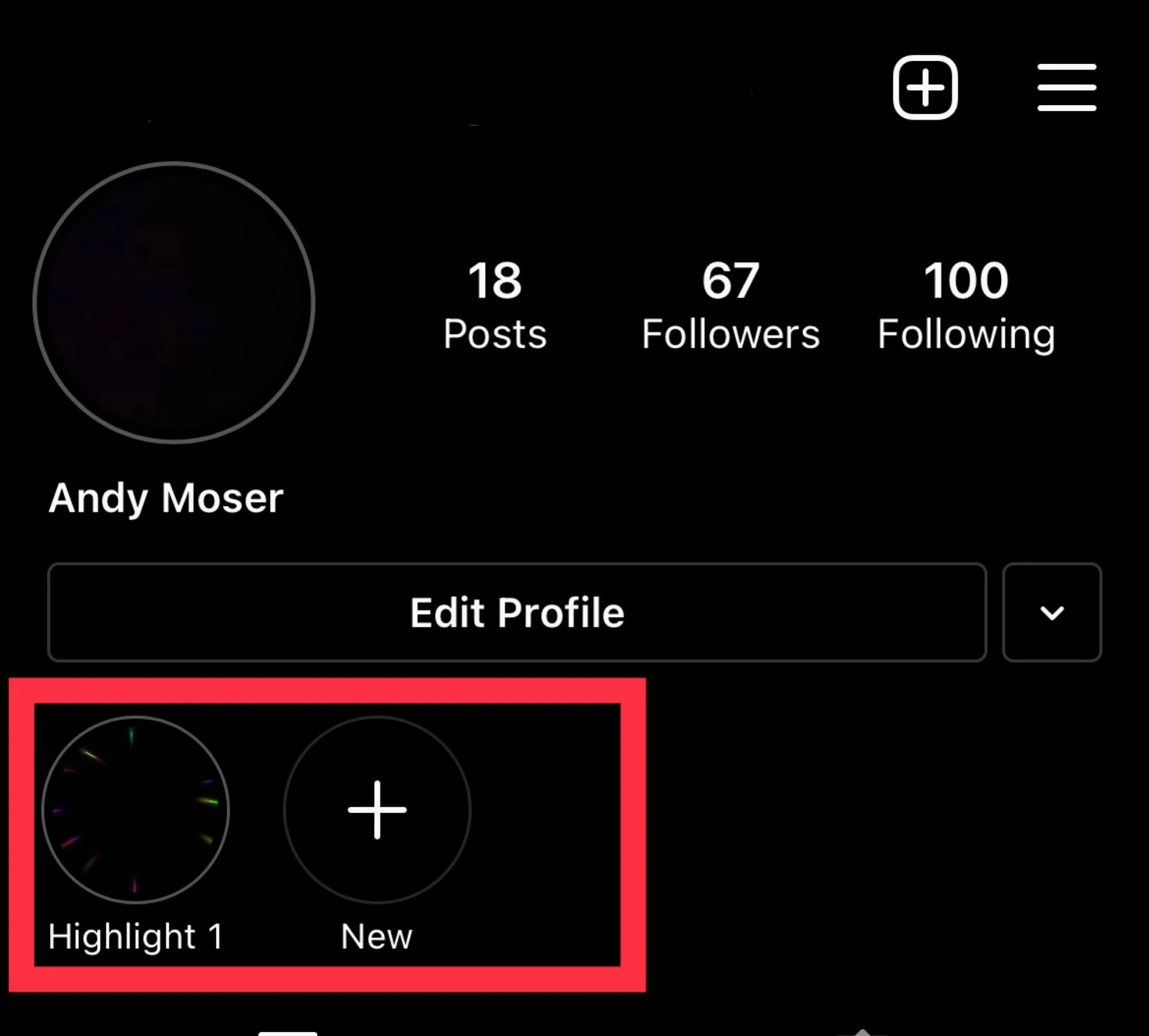
Highlights are collections of past Stories that you choose to feature on your profile. They appear in circular icons below your bio on your profile page in Instagram.
They’re great for:
Showcasing products or services
Saving travel memories
Posting FAQs or tutorials
Sharing reviews and testimonials
Creating themed content collections
Method 1: Add a Highlight from an Active Story (Within 24 Hours)
If your Story is currently live:
Step 1:
Open your active Story.
Step 2:
Tap the “Highlight” button at the bottom of the screen.
Step 3:
Select an existing Highlight OR
Tap “New” to create a new Highlight.
Step 4:
Name your Highlight and tap Add.
Done! 🎉 Your Story is now saved permanently in your profile Highlights.
Method 2: Add a Highlight from Story Archive (After 24 Hours)
Even if your Story has expired, you can still add it—if Archive is turned on.
Step 1:
Go to your Instagram profile.
Step 2:
Tap the “+” (New) circle under your bio in the Highlights section.
Step 3:
Select Stories from your Archive.
Step 4:
Tap Next, name your Highlight.
Step 5:
Choose a cover (optional) and tap Done.
How to Edit or Add More Stories to an Existing Highlight
To Add More Stories:
Go to your profile
Press and hold the Highlight
Tap Edit Highlight
Select Stories
Choose additional Stories
Tap Done
To Change the Cover:
Press and hold the Highlight
Tap Edit Highlight
Select Edit Cover
Choose a Story or upload a custom image
Pro Tips for Better Instagram Highlights
✔ Use branded cover icons for a clean look ✔ Keep titles short (1 word works best) ✔ Organize by topic (Shop, Reviews, Travel, Tips) ✔ Update Highlights regularly
If you’re doing affiliate marketing—like in crypto or investment—you can use Highlights to:
Save proof of results
Share tutorials
Pin important updates
Add FAQs for beginners
This builds trust and keeps key information easy to find.
Why Highlights Matter
Highlights act like a mini website on your Instagram profile. When someone visits your page, they can quickly understand:
Who you are
What you offer
Why they should follow you
They’re especially powerful for creators, businesses, and affiliate marketers.